
How to run parallel steps with fan-out and merge
Most playbooks are linear: extract, then classify, then respond. But a fair number of real workflows are naturally parallel. You need to pull data from three different document types before you can make a decision, or run the same input through two different models to compare answers, or fire off an independent compliance check alongside the main generation step without making the user wait for both to happen one after another.
Running these steps sequentially works, but it costs you latency for no reason, and it makes the playbook graph harder to reason about. A linear chain implies "step 2 needs step 1's output," which usually isn't true when the two steps are actually independent.
fan_out and merge nodes solve this by letting a playbook branch into multiple concurrent paths and then rejoin them once every branch has finished. This tutorial is aimed at teams already comfortable building linear and simple-branch playbooks who are ready to model genuinely parallel work. By the end, you'll know:
- When fan-out/merge is the right tool, versus when a simple sequential chain is actually simpler and safer
- How to structure a playbook graph with a fan-out node, N parallel branches, and a merge node
- How input is distributed to each branch, and how outputs are combined at the merge point
- How to bound concurrency so a single request doesn't spawn unbounded parallel LLM calls
- How to debug a fan-out playbook when one branch fails and others succeed
1How It Works
A playbook is a directed graph of steps. Every step so far in a linear or simple-branch playbook has exactly one path forward. A
fan_outnode changes that: it has multiple outgoing edges that all execute concurrently, each leading to its own branch of one or more steps. Amergenode is the corresponding rejoin point. It waits for every branch reaching it to complete, then combines their outputs into a single result that continues downstream.Concretely, the executor treats a
fan_outnode as a signal to schedule all of its downstream branches as concurrent tasks in ValGuard's orchestration engine, each with a copy of the input state at the moment of the fan-out. Each branch runs its own steps, including validation, completely independently. A validation failure in one branch does not automatically cancel other branches; whether it should route the whole playbook to a failure path is a decision you make at the merge node using the same route conditions (on_validation_block,on_rule_failed, etc.) available everywhere else in the graph.Concurrency is bounded server-side by a configurable maximum (
FanOutMaxParallelin the executor). This exists specifically so a single playbook execution can't accidentally spawn an unbounded number of simultaneous upstream LLM calls, which would be both a cost risk and a fairness problem for other tenants sharing the engine.2Prerequisites
- Familiarity with building linear playbooks and simple branches (see the fallback-logic and chain-agents tutorials)
- A concrete use case with genuinely independent steps. The example we'll use throughout is a three-way document match: an invoice, a purchase order, and a fraud-pattern check on vendor history, all extracted independently before being cross-checked
- Access to the Map view in the playbook editor (fan-out graphs are considerably easier to build and read in Map view than in the linear Storyboard view)
- An understanding of your cost tolerance. Fan-out multiplies the number of concurrent LLM calls per execution, which multiplies cost and rate-limit exposure per request
3Step-by-Step Setup
4Step 1: Confirm your steps are actually independent
Before reaching for fan-out, check one thing: does any branch need another branch's output as input? If yes, that's a sequential dependency, not a parallel opportunity. Model it as a normal chain instead. Fan-out is for steps that only depend on the original playbook input, not on each other.
In our example: extracting fields from an invoice PDF, extracting fields from a purchase order PDF, and checking a vendor's fraud-pattern history are all independent lookups against the same original request payload. None needs the others' output to run.
5Step 2: Open the playbook in Map view and add a fan-out node
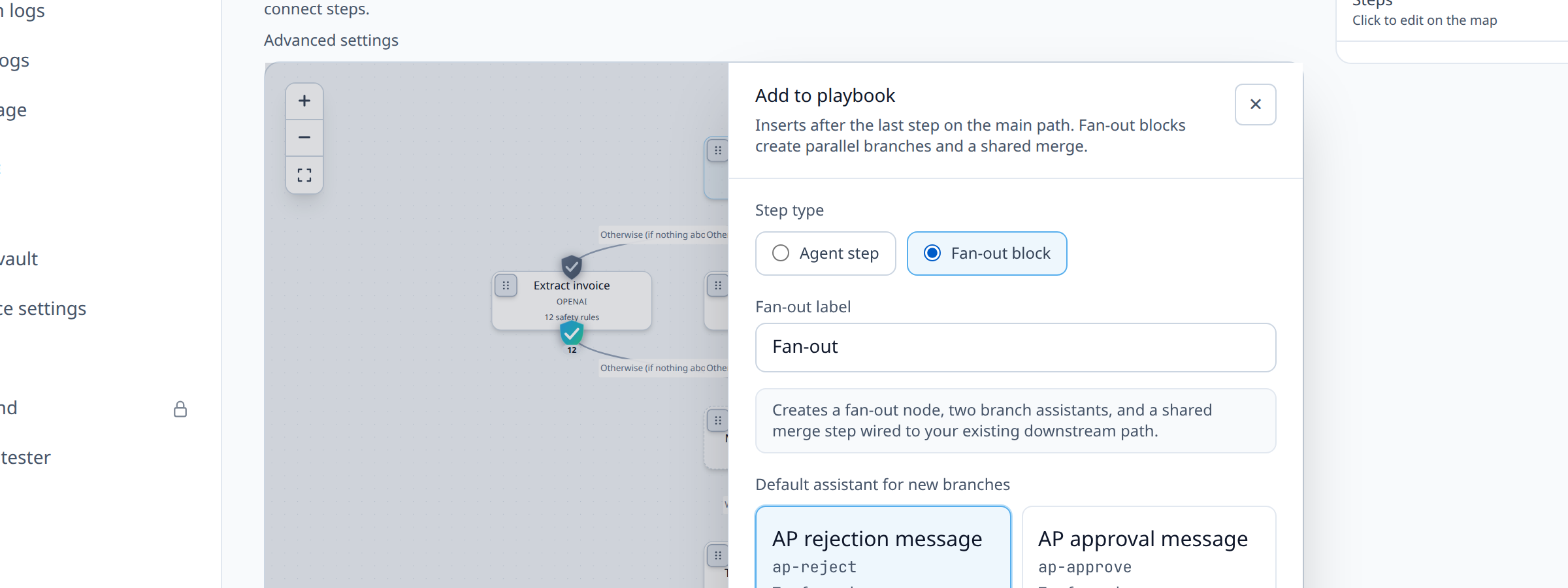
Drag a Fan-out block from + Add step on the Map (or + Add parallel block in Storyboard) after your entry step, or use a published template such as
vendor-invoice-three-way-matchorparallel-kyc-document-bundle.Marketplace fan-out playbooks (7):
vendor-invoice-three-way-match,parallel-kyc-document-bundle,parallel-incident-enrichment,multi-source-research-fanout,parallel-refund-review,parallel-ticket-enrichment,parallel-extract-repair-fallback.6Step 3: Add one branch per independent task
For each parallel task, add a step (or short chain of steps) connected from the fan-out node. In our example:
extract_invoice,extract_purchase_order, andfraud_pattern_check, each pointing at its own agent.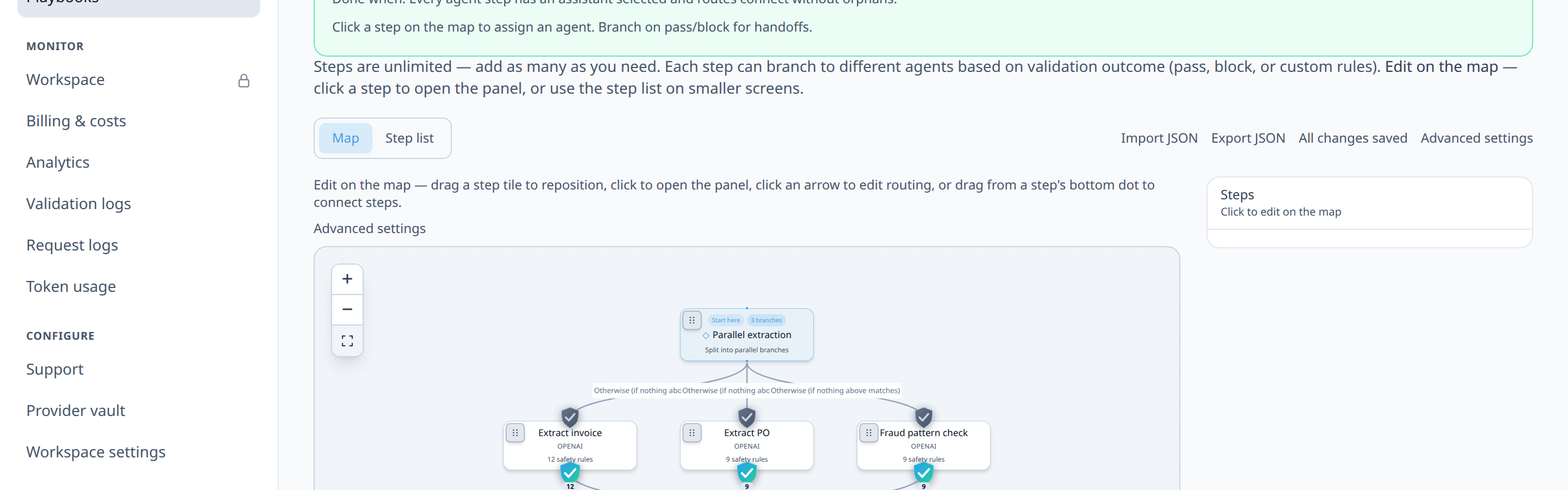
7Step 4: Set the input mode for each branch
Each branch step needs an
input_mode. Since all three branches are working from the same original request rather than from each other's output, setpass_throughon all three. Each branch receives the playbook's original input independently.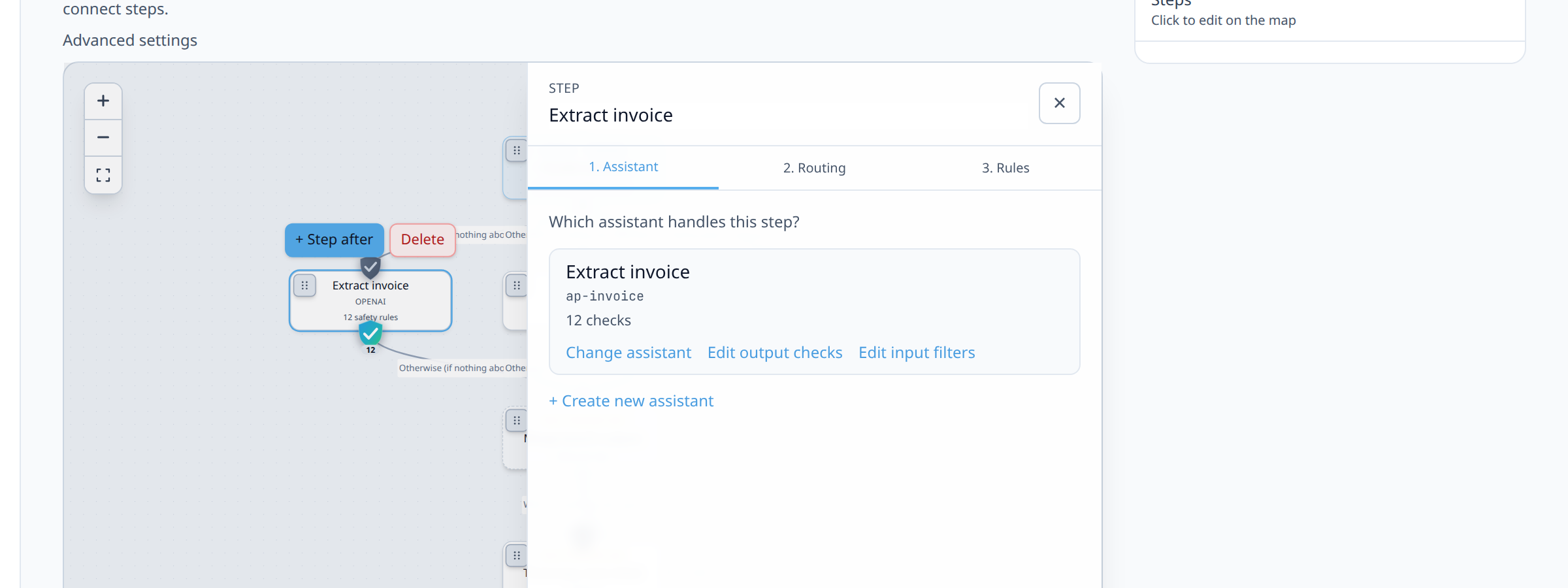
8Step 5: Add a merge node where the branches reconverge
Drag a
mergenode onto the canvas and connect all three branches into it.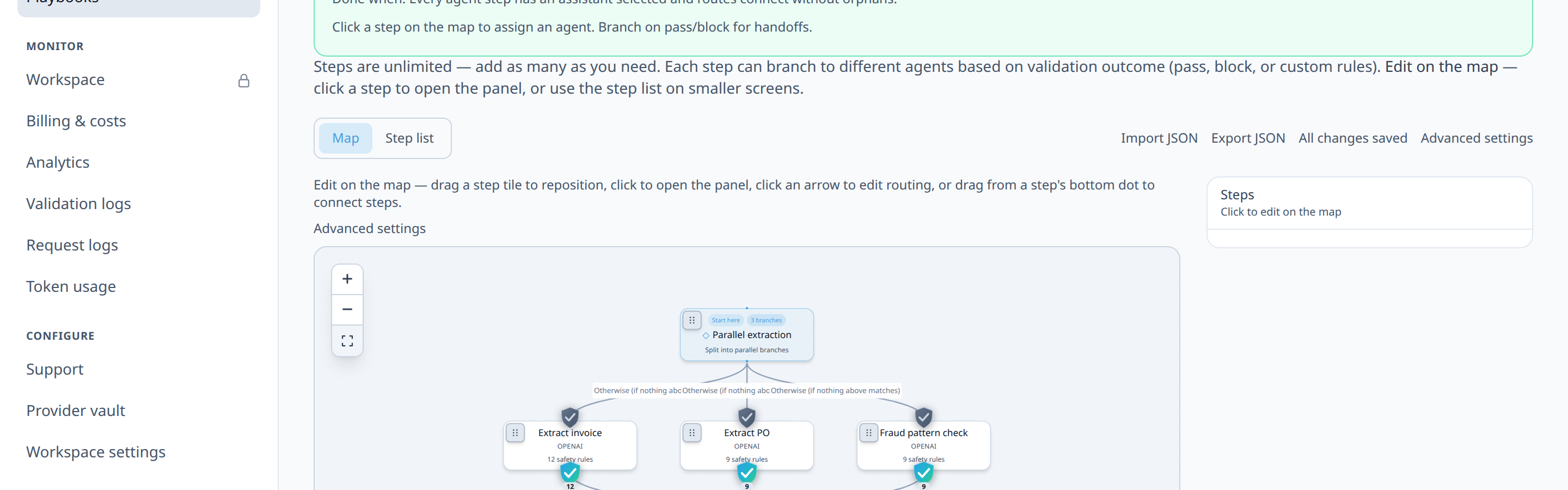
9Step 6: Add the decision step after the merge
Add your cross-checking step immediately after the merge node. This is the step that actually looks at all branch outputs together. In our example, attach validators
branch_outputs_presentandcross_branch_field_matchon the post-merge agent (see theinvoice_three_way_cross_check_agenttemplate), comparing invoicegross_amountagainst POtotal_amountand requiring all branch payloads in the mergedjson_object.10Step 7: Configure routes out of the decision step
Same route conditions as any other step:
on_validation_passto an approval step,on_validation_blockto a review-handoff step. For partial success (e.g. 2 of 3 branches pass), setmerge_policy: min_passing_brancheson the merge step and add anon_partial_passroute from merge. Thebranch_pass_countvalidator can enforce minimum passing branches on the post-merge agent. See also fallback-logic for partial-failure patterns.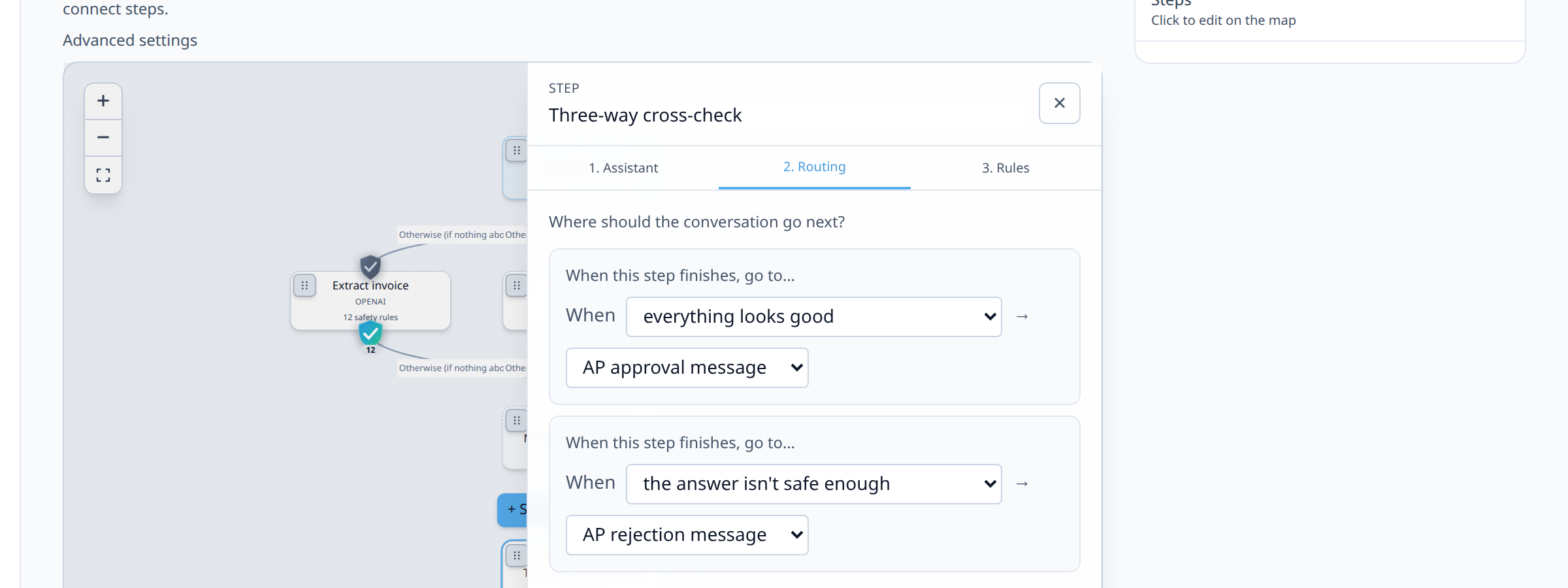
11Step 8: Set a sane concurrency expectation
Check your plan tier's
fan_out_max_parallelentitlement, the concurrent branch cap enforced per fan-out node:Plan Max parallel branches Free 3 Developer 5 Growth 8 Production 12 Enterprise Unlimited (0 = no plan cap; still bounded by platform env limits) If you're fanning out into more branches than your limit, the extra branches queue rather than running instantly in parallel, which defeats some of the latency benefit. Keep the branch count per fan-out modest (single digits) rather than trying to parallelize dozens of tiny sub-tasks.
12Step 9: Test in Simulate before publishing
Use the Try it → Simulate panel to declare a Pass/Block outcome for each branch and confirm the timeline tags all three branch steps with the same
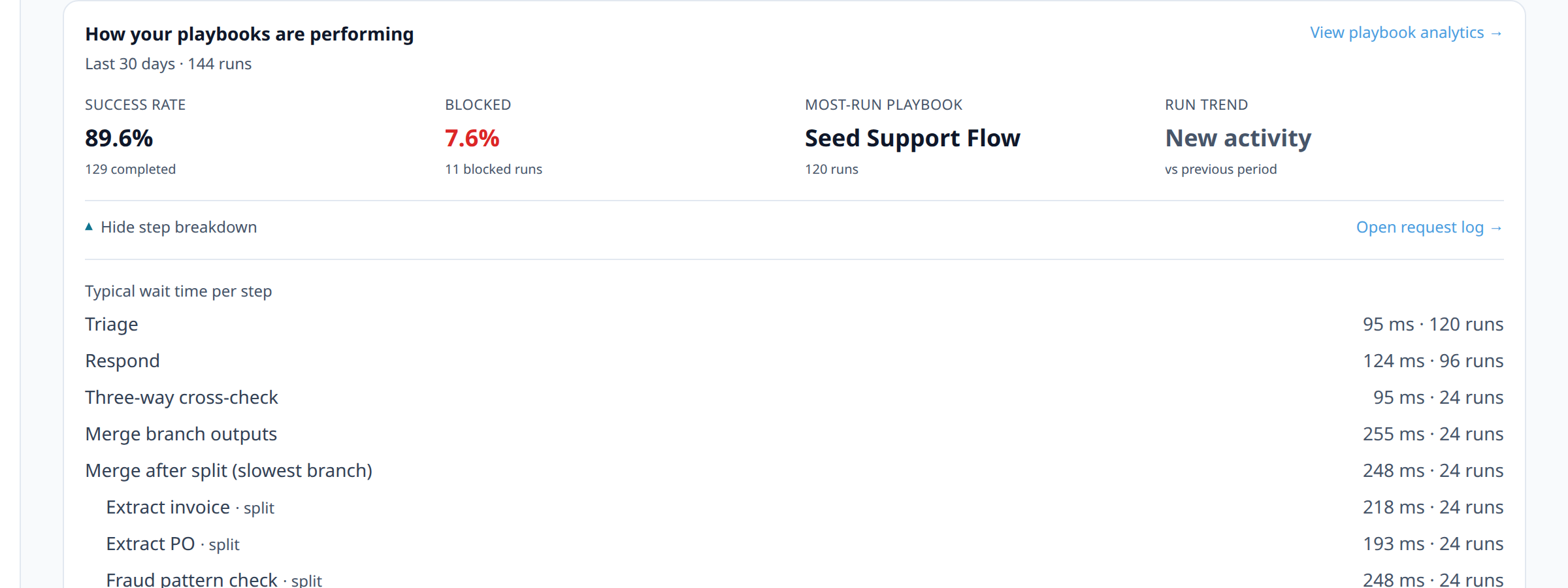
parallel_groupbadge and that the merge step correctly combines their declared outputs per itsmerge_mode. Simulate is a client-side routing preview. It doesn't call any agent, so it can confirm the graph shape fans out and rejoins correctly, but it can't demonstrate actual concurrent timing (there's nothing running concurrently to time). For that, run one real request through Live and check Dashboard → Playbooks (How your playbooks are performing on the list, or per-playbook when a flow is selected), which reports per-step latency grouped byparallel_group. A genuinely parallel fan-out shows each branch's latency independently, with the merge step's wall-clock time close to the slowest branch rather than the sum of all of them.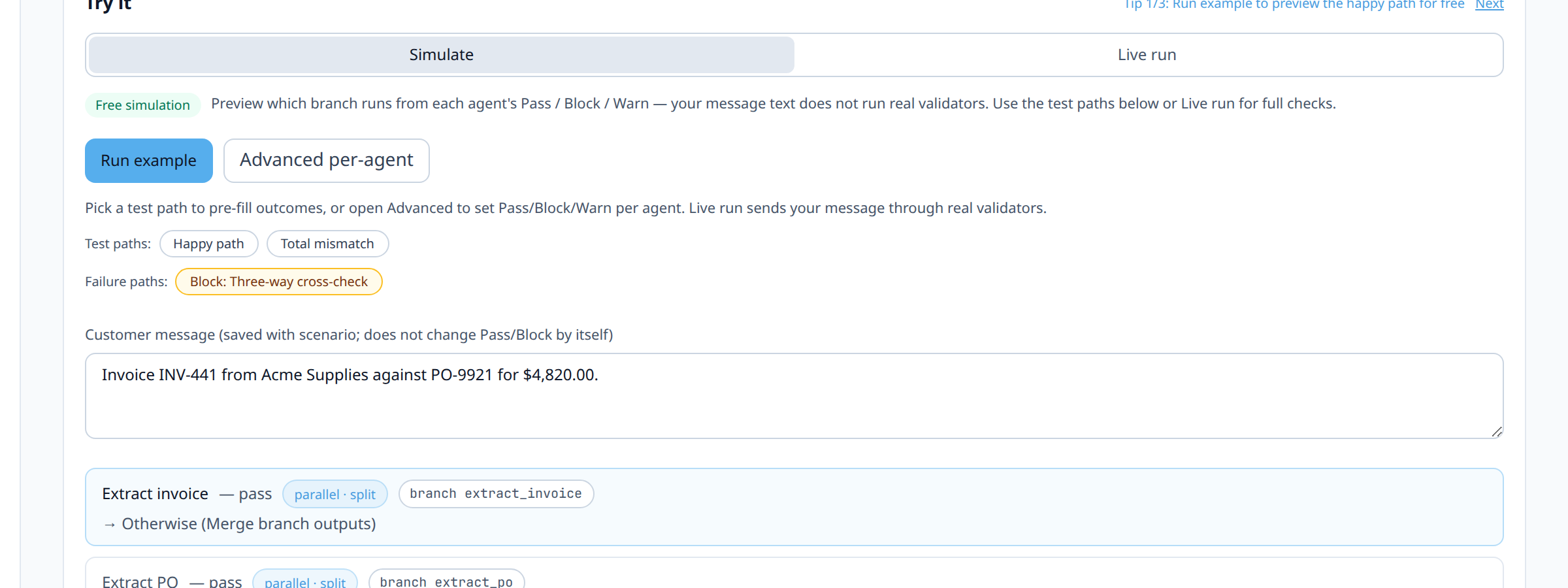
13Step 10: Publish and monitor the merge point specifically
After going live, pay particular attention to the merge step's metrics in orchestration analytics. A merge node's latency is bounded by its slowest branch, so if one branch (say, a slow OCR-heavy invoice extraction) consistently lags, that's your actual latency bottleneck, not the merge itself.
14Diagram / Flow
15Configuration Examples
Simplified orchestration template excerpt showing the fan-out/merge shape:
id: vendor-invoice-three-way-match complexity: fan_out_merge min_executor: s16 graph: entry_step_key: split steps: - step_key: split node_type: fan_out - step_key: extract_invoice node_type: agent agent_slug: "{{extract_invoice}}" input_mode: pass_through - step_key: extract_po node_type: agent agent_slug: "{{extract_po}}" input_mode: pass_through - step_key: fraud_check node_type: agent agent_slug: "{{fraud_check}}" input_mode: pass_through - step_key: join node_type: merge merge_mode: json_object - step_key: cross_check node_type: agent agent_slug: "{{cross_check}}" input_mode: append_previous routes: - from_step_key: join to_step_key: cross_check condition_type: always - from_step_key: cross_check to_step_key: approve_payment condition_type: on_validation_pass priority: 10 - from_step_key: cross_check to_step_key: review_handoff condition_type: on_validation_block priority: 20 ``` **Example curl call and response headers:** ```bash curl -si "$VG_PROXY/v1/chat/completions" \ -H "Authorization: Bearer $VG_API_KEY" \ -H "X-VG-Flow: vendor-invoice-three-way-match" \ -H "Content-Type: application/json" \ -d '{"model":"openai/gpt-4o-mini","messages":[{"role":"user","content":"Invoice #4471, PO #9982, vendor Acme Supplies..."}]}' ``` ``` X-VG-Orchestration-Path: fan_out_extract > (extract_invoice | extract_purchase_order | fraud_pattern_check) > merge_extractions > cross_check > approve_payment X-VG-Target-Type: playbook16Testing and Verification
- Simulate routing check. In the Try it panel, confirm branch steps share the same
parallel_groupbadge and all rejoin at the intended merge step. This confirms the graph shape is correct, though Simulate can't demonstrate actual concurrency (see Step 9). - Single-branch failure test. Deliberately send an input that will fail validation in exactly one branch (e.g., a purchase order with a missing PO number) and confirm the merge node still waits for and receives the other two branches' outputs before the cross-check step runs.
- Orchestration analytics. After a few live runs, check Dashboard → Playbooks for step-level latency. Confirm the merge step's recorded latency roughly equals your slowest branch's latency, not the sum of all branches (which would indicate something is serializing unexpectedly).
- Simulate routing check. In the Try it panel, confirm branch steps share the same
17Troubleshooting
"My branches seem to run one after another, not in parallel." Check that all three branches are wired directly off the same
fan_outnode withcondition_type: alwaysand no accidental sequential dependency (e.g., branch B'sinput_modeset toappend_previous, which would make it wait for branch A). All parallel branches should usepass_throughunless you specifically intend one to depend on another, in which case it isn't a true fan-out candidate."The merge step never triggers." Confirm every branch actually has a route reaching the merge node, including any conditional branches within a multi-step arm. If one internal branch step has a failure route that dead-ends without reaching the merge node, the merge will wait forever (or time out) for that branch.
"One slow branch is dragging down the whole playbook." This is expected behavior (merge waits for the slowest branch by design), but it usually means that branch shouldn't be in the parallel group, or needs its own timeout/fallback route so a stuck branch doesn't block the others indefinitely. Consider adding a bounded timeout on the slowest branch with a fallback default value if it doesn't complete in time.
"I'm hitting a concurrency limit and branches are queueing instead of running immediately." Check your plan's
fan_out_max_parallelentitlement (see Step 8). If you routinely need more concurrent branches than your limit allows, consider whether some branches can be pre-computed outside the playbook (e.g., a fraud-pattern lookup against a fast internal API rather than an LLM call) rather than adding more LLM-backed parallel branches."Costs went up more than I expected after switching to fan-out." Fan-out doesn't reduce the number of LLM calls. It only changes when they happen (concurrently instead of sequentially). If your total cost went up, check whether you accidentally duplicated a step across branches, or whether what used to be a single combined extraction call is now three separate calls each incurring their own base overhead.
18Best Practices
- Only fan out steps that are truly independent. If you're unsure whether two steps depend on each other, model them sequentially first, get correctness right, and parallelize afterward as a pure performance optimization.
- Keep the branch count small and meaningful. Three to five branches is a sweet spot for most real workflows; if you're fanning out into a dozen tiny branches, consider whether some of them can be combined into a single agent call instead.
- Put your slowest branch under scrutiny first, since it defines your merge latency floor. Often the best optimization isn't parallelizing more, it's speeding up (or replacing) the single slowest branch.
- Design the merge/decision step to be resilient to partial data. If a branch is allowed to fail without blocking the whole playbook (via
on_fail: warninside that branch), make sure your cross-check step's logic explicitly handles a missing field rather than assuming all three branches always succeed. - Watch orchestration analytics after go-live, not just Simulate. Synthetic test data rarely reproduces the real-world latency skew you'll see across branches once traffic is diverse.
19Advanced Options
Nested fan-out. A branch coming out of a fan-out node can itself contain another fan-out/merge pair, useful for genuinely hierarchical parallel work (e.g., extracting from three documents, and within one of those branches, running two independent checks on the extracted data). Keep nesting shallow; deeply nested fan-out graphs become difficult to reason about and debug.
Combining fan-out with sub-flows. Rather than inlining every branch's steps directly in the parent playbook, a branch can point at a
sub_flownode referencing a separate, independently maintained playbook. This is useful when one branch's logic is complex enough to deserve its own versioned, independently tested playbook (for example, a full KYC sub-flow triggered as one branch of a larger onboarding fan-out).Partial-success routing. Rather than a binary "all branches must pass," you can route at the merge/decision step based on how many branches passed (using
json_field_equalsagainst a count you compute in the cross-check step), enabling policies like "auto-approve if 2 of 3 checks pass, otherwise escalate" instead of an all-or-nothing gate.20Summary and Next Steps
Fan-out and merge let you model genuinely parallel work honestly, instead of forcing independent tasks into an artificial sequential chain. The mental model is simple: a fan-out node schedules concurrent branches from a shared input, a merge node waits for all of them and combines their outputs. The practical value shows up directly in latency. Three independent extraction calls running concurrently instead of back-to-back can meaningfully shorten your playbook's total execution time.
From here, a natural next step is revisiting fallback logic with an eye toward what happens when exactly one branch inside a fan-out fails. Designing that partial-failure path deliberately, rather than discovering it in production, is what separates a fan-out playbook that's genuinely more resilient from one that's just faster until something breaks.