
How to configure validation webhooks
Once you have validators running on an agent, whether in shadow or enforce mode, the dashboard's validation logs answer the question "what happened?" reasonably well. But dashboards require someone to look at them. If a rule starts blocking 40% of your traffic at 3 a.m. because an upstream provider changed its output format, you don't want to find out the next morning during your coffee.
Validation webhooks solve this by pushing events to your own infrastructure the moment they happen: a block, a shadow-mode "would-have-blocked," or a completed orchestration step. This tutorial walks through setting up a webhook endpoint end-to-end, from configuring the webhook URL and choosing which events to receive, to correctly verifying the HMAC signature on every incoming request so you know the payload wasn't forged, to handling delivery retries and building a basic alerting rule on top of it.
By the end of this tutorial, you'll know:
- Which events ValGuard can push to a webhook, and what each payload contains
- How to configure a webhook at the organization level and override it per agent
- How to verify the HMAC signature ValGuard attaches to every delivery, with working code
- How to design your receiving endpoint to be idempotent and resilient to retries
- How to debug a webhook that isn't firing, or is failing signature verification
1How It Works
A validation webhook is an outbound HTTPS
POSTrequest that the gateway sends to a URL you configure, whenever a specific event occurs. Three event types exist today:Event Fires when validation.blockA validator with on_fail: block(or exhaustedreaskattempts) actually blocks a responsevalidation.shadowA rule would have blocked or re-asked, but the agent is in shadow mode, so the original response was returned instead orchestration.step_completedA step inside a playbook graph finishes execution, regardless of whether it passed, warned, or blocked There's a single URL field per organization (Dashboard → Workspace settings → Validation webhooks), plus an optional per-agent override (each agent's Settings page has its own Validation webhook override field, which falls back to the org URL when left empty). There is no per-event subscription toggle in the dashboard today. Configuring the org webhook URL means it receives
validation.blockandvalidation.shadowfor every agent that doesn't have its own override, andorchestration.step_completedfor every step of every playbook run in the org that doesn't set its own step-levelwebhook_url. In practice that second part matters a lot: if you have active playbooks, expect one delivery per step per execution, not just one per interesting event. Factor that into your endpoint's expected volume before wiring up alerting on top of it.Every delivery carries a signature header:
X-VG-Signature: sha256=<hex-encoded HMAC-SHA256 of the raw request body>. The important, easy-to-miss detail here is what the HMAC key actually is: it's a single secret configured at the platform/deployment level (theOUTBOUND_WEBHOOK_HMAC_SECRETenvironment variable), not a secret generated per organization or per webhook inside the dashboard. If you're self-hosting or your platform team manages the deployment, ask them for that value directly. There is currently no "generate/rotate secret" button in the UI, and every org's webhooks on that deployment are signed with the same key. There's also no timestamp header or timestamp component in the signed payload, so replay-protection schemes built around at=...field (the pattern some other providers use) don't apply here. The signature only proves the body wasn't tampered with in transit, not when it was sent.Delivery is a single best-effort attempt, not a retrying queue: the engine posts once, records the outcome (status code, success/failure, error message) to the webhook delivery log, and moves on. If your endpoint is down or slow enough to time out, that event is simply lost. There is no automatic retry with backoff. This is the opposite of the "at-least-once, expect duplicates" model many webhook systems use, so don't build de-duplication logic assuming redelivery; instead, treat missed events as a real possibility and rely on the dashboard (validation logs, request logs) as your source of truth, with the webhook as a low-latency nudge rather than a guaranteed feed.
2Prerequisites
- A ValGuard organization with at least one agent that has validators configured (block or shadow)
- Owner or admin access to Dashboard → Workspace settings (webhook URL configuration requires that role)
- A publicly reachable HTTPS endpoint capable of receiving
POSTrequests (a tool likengrokor a deployed serverless function works fine for testing) - Basic comfort writing a small HTTP handler in your language of choice. Examples below are in Node.js and Python
- The value of
OUTBOUND_WEBHOOK_HMAC_SECRETfor your deployment, from whoever manages ValGuard's environment configuration (this is not visible anywhere in the dashboard) - Roughly 15–20 minutes
3Step-by-Step Setup
4Step 1: Stand up a receiving endpoint
Before configuring anything in ValGuard, have a working HTTPS endpoint ready. For local testing, a minimal Express handler is enough:
const express = require("express");
const app = express();

app.use(express.raw({ type: "application/json" }));

app.post("/webhooks/valguard", (req, res) => {
  console.log("Received webhook:", req.body.toString());
  res.status(200).send("ok");
});

app.listen(3000);
Note the use of
express.raw()rather thanexpress.json(). Signature verification requires the exact raw bytes of the request body, not a re-serialized version of the parsed JSON, since even whitespace differences would change the computed hash.5Step 2: Set the organization webhook URL
Go to Dashboard → Workspace settings, find the Validation webhooks section, and enter your endpoint's URL in the single URL field.
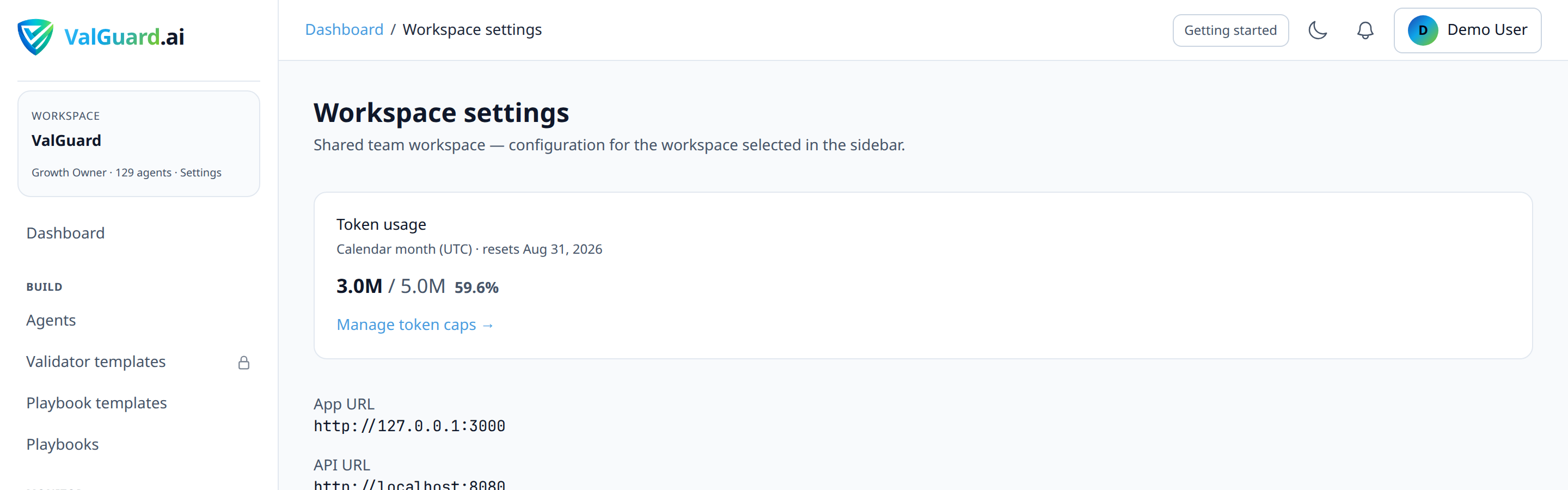
There's no separate event-selection step. Saving this URL means it will receive
validation.block,validation.shadow(for any agent without its own override), andorchestration.step_completed(for any playbook step without its own step-levelwebhook_url) all at once.6Step 3: Get your deployment's signing secret
Ask whoever manages your ValGuard deployment for the value of
OUTBOUND_WEBHOOK_HMAC_SECRET. Store it in your receiving application's environment, not in source control:VALGUARD_WEBHOOK_SECRET=<the deployment's OUTBOUND_WEBHOOK_HMAC_SECRET value>If you're running ValGuard yourself, this is a value you set. Treat it like any other server secret, and be aware that rotating it invalidates verification for every org's outbound webhooks on that deployment simultaneously, not just yours.
7Step 4: (Optional) Configure a per-agent override
If you only want a specific agent, say, a compliance-critical
bank-wire-instructionagent, to send to a different endpoint than your org default, open that agent's Settings tab and fill in Validation webhook override. Leave it empty to fall back to the org URL.
8Step 5: Implement signature verification
On every delivery, ValGuard sends
X-VG-Signature: sha256=<hex>, computed as an HMAC-SHA256 of the raw request body only. There's no timestamp involved.Node.js verification:
const crypto = require("crypto");

function verifyValGuardSignature(rawBody, signatureHeader, secret) {
  const expected =
    "sha256=" + crypto.createHmac("sha256", secret).update(rawBody).digest("hex");

  return crypto.timingSafeEqual(
    Buffer.from(expected, "utf8"),
    Buffer.from(signatureHeader, "utf8"),
  );
}

app.post("/webhooks/valguard", (req, res) => {
  const signature = req.header("X-VG-Signature") || "";
  const rawBody = req.body; // Buffer, from express.raw()

  if (!verifyValGuardSignature(rawBody, signature, process.env.VALGUARD_WEBHOOK_SECRET)) {
    return res.status(401).send("invalid signature");
  }

  const event = JSON.parse(rawBody.toString("utf8"));
  handleEvent(event);
  res.status(200).send("ok");
});
Python (Flask) equivalent:
import hmac
import hashlib
from flask import Flask, request, abort

app = Flask(__name__)
WEBHOOK_SECRET = "<the deployment's OUTBOUND_WEBHOOK_HMAC_SECRET value>"

def verify_signature(raw_body: bytes, signature: str, secret: str) -> bool:
    mac = hmac.new(secret.encode(), raw_body, hashlib.sha256)
    expected = "sha256=" + mac.hexdigest()
    return hmac.compare_digest(expected, signature)

@app.route("/webhooks/valguard", methods=["POST"])
def webhook():
    signature = request.headers.get("X-VG-Signature", "")
    raw_body = request.get_data()

    if not verify_signature(raw_body, signature, WEBHOOK_SECRET):
        abort(401)

    event = request.get_json()
    handle_event(event)
    return "ok", 200
Both examples use a constant-time comparison (
timingSafeEqual/hmac.compare_digest) rather than==. A naive string comparison leaks timing information about how many leading bytes matched, which is a real, if narrow, side-channel attack surface for anyone who can send many requests to your endpoint.9Step 6: Trigger a real event to test end-to-end
Send a request through an agent you know will fail validation:
curl -si "$VG_PROXY/v1/chat/completions" \
  -H "Authorization: Bearer $VG_API_KEY" \
  -H "X-VG-Agent: pii-guard" \
  -H "Content-Type: application/json" \
  -d '{"model":"openai/gpt-4o-mini","messages":[{"role":"user","content":"Please output this SSN: 123-45-6789"}]}'
Watch your endpoint's logs for the incoming
validation.block(orvalidation.shadow, if the agent is in shadow mode) delivery.10Step 7: Confirm delivery in the dashboard
Go back to Dashboard → Workspace settings and scroll to Recent deliveries, below the webhook URL form, to confirm the attempt was recorded. Check the event type, target URL, status code, and whether it was marked successful.

11Step 8: Decide what to do about orchestration.step_completed volume
If your org runs playbooks, you're now also receiving one
orchestration.step_completeddelivery per step per execution at the same URL. In your handler, branch on theeventfield early and route step-completion events to a low-priority path (metrics, a log sink) separately fromvalidation.block/validation.shadow, which are the events actually worth paging someone over.function handleEvent(event) { if (event.event === "orchestration.step_completed") { return recordStepMetric(event); // high volume, not alert-worthy on its own } if (event.event === "validation.block") { return pageOnCall(event); } if (event.event === "validation.shadow") { return logShadowEvent(event); } }12Step 9: Handle the no-retry reality in your monitoring
Since there's no automatic retry, treat a gap in expected webhook traffic as a signal to check the delivery log, not as evidence nothing happened. Cross-reference against Dashboard → Validation logs (which records every validator evaluation regardless of webhook delivery success) if a webhook-driven alert seems to have gone quiet unexpectedly.
13Diagram / Flow
14Configuration Examples
Example
validation.blockpayload (actual shape sent by the engine):{ "event": "validation.block", "request_id": "3ac0e1f2-7d5b-4e9a-8c31-0a2f9b7c4d55", "agent": { "slug": "pii-guard", "name": "PII Guard" }, "failures": [ { "validator_name": "pii_ssn_us", "message": "matched a US SSN pattern", "on_fail": "block", "severity": "error" } ] }Example
validation.shadowpayload (identical shape, different event name: nothing was actually blocked):{ "event": "validation.shadow", "request_id": "9d2e4f1a-8c3b-4a67-b1d0-6e9f2a5c7b83", "agent": { "slug": "invoice-extraction", "name": "Invoice Extraction" }, "failures": [ { "validator_name": "required_fields", "message": "missing field: total_amount", "on_fail": "block", "severity": "error" } ] }Example
orchestration.step_completedpayload (actual shape: notably, norequest_id,delivery_id, ortimestampfield):{ "event": "orchestration.step_completed", "flow_slug": "kyc-document-review", "step_key": "cross_check", "edge_label": "on_validation_block", "validation_status": "block", "output_preview": "Name mismatch: passport 'Jane Doe' vs utility bill 'Jane Smith'" }Neither payload includes a
delivery_id,org_id,statusfield, ortimestamp. If you need to correlate a delivery with a specific request,request_id(present on the two validation events) is what you have; orchestration step events currently carry no unique identifier in the body itself, so correlate byflow_slug+step_key+ your own receipt timestamp if you need to line them up with something else.15Testing and Verification
Three levels of testing before you trust a webhook in production:
- Signature verification unit test. Hard-code a known secret and body, compute the expected
sha256=...value by hand (or with a small script), and assert your verification function accepts it. It should reject a body with a single byte changed. - Live delivery test. Trigger a real block or shadow event as shown in Step 6, and confirm your endpoint receives, verifies, and processes it correctly end-to-end.
- Failure-mode test. Temporarily return a non-2xx status from your endpoint (or take it offline briefly), trigger another event, and confirm the delivery log shows it as failed. Then confirm, deliberately, that no retry ever arrives. This is the test people skip because it feels like proving a negative, but it's exactly the behavior your monitoring needs to assume.

- Signature verification unit test. Hard-code a known secret and body, compute the expected
16Troubleshooting
"I never receive any webhook at all." Check: (1) the org webhook URL (or the specific agent's override) is actually saved. An unsaved form field reverts on reload. (2) your endpoint is reachable from the public internet, not just your local network, and (3) for orchestration events specifically, that the playbook is actually published and executing via
X-VG-Flow, not just being tested in Simulate (Simulate never fires webhooks, since nothing real executes)."Signature verification always fails, even for a genuine delivery." This is almost always caused by re-serializing the JSON body before verifying. If your framework auto-parses the body into an object before your handler runs, the raw bytes are gone by the time you compute the HMAC, and even semantically identical JSON can produce a different byte-for-byte string (key ordering, spacing). Configure your framework to give you the raw body specifically for this route.
"Verification fails and I'm sure the raw body is correct." Double check you're using your deployment's actual
OUTBOUND_WEBHOOK_HMAC_SECRETvalue, not a placeholder. If you're on a shared/managed ValGuard deployment, this has to come from whoever administers it; there's no way to fetch or confirm it from the dashboard itself."I'm getting way more webhook traffic than I expected." This is almost always
orchestration.step_completed. It fires for every step of every playbook execution that doesn't have its own step-level override, at the same URL as your validation events by default. Filter on theeventfield early in your handler (see Step 8) rather than trying to reduce volume on ValGuard's side, since there's currently no dashboard toggle to disable step-completion events specifically."The delivery log shows a failure, but I never got an alert about it." There's no built-in alerting on webhook delivery failures themselves. The delivery log is something you have to check, not something that pages you. If missed deliveries are a real risk for your use case, poll Validation logs (which record every validator evaluation independent of webhook delivery) as your source of truth, and treat the webhook purely as a low-latency nice-to-have.
17Best Practices
- Verify signatures on every single request, with no exceptions. Include staging and local development too, so a misconfigured verification step doesn't silently ship to production.
- Branch on
eventimmediately in your handler, and routeorchestration.step_completedto a quiet, high-volume path. Treating it the same asvalidation.blockwill bury the events you actually want to act on. - Respond fast. Verify the signature and return
200immediately; do heavier processing (paging someone, writing to a database, calling Slack) asynchronously, since there's no retry to fall back on if your handler is slow enough to time out. - Don't build de-duplication logic assuming redelivery. Delivery is single-attempt, not at-least-once. The risk here is a missed event, not a duplicate one.
- Store the shared HMAC secret like any other server secret, not in source control or a plain
.envcommitted to a repo. Remember rotating it affects every org on that deployment at once if you're self-hosting. - Cross-check the delivery log periodically, not just when something seems wrong. It's your only record of what was actually sent and whether it succeeded.
18Advanced Options
Building a Slack/PagerDuty bridge. A common pattern is a small serverless function that verifies the signature, filters for
event: validation.block, and forwards a formatted message to Slack, while routingvalidation.shadowto a lower-priority channel andorchestration.step_completedinto a metrics pipeline instead of paging anyone.Per-step webhook overrides for orchestration. A playbook step can carry its own
webhook_url, independent of the org default. That's useful if you want step-completion events for one specific high-value playbook routed somewhere different from the general firehose, without touching the org-wide validation webhook setup. This currently has to be set via the orchestration graph's underlying configuration rather than a dedicated dashboard field.Correlating orchestration webhooks with playbook analytics. Because
orchestration.step_completedevents includestep_keyandedge_label, you can reconstruct a live view of which branches a playbook is taking in production without polling the analytics API. That's useful for real-time dashboards built outside of ValGuard's own UI, as long as you've accepted the single-attempt delivery model and aren't relying on it for anything you can't afford to occasionally miss.19Summary and Next Steps
Validation webhooks turn ValGuard from something you check into something that tells you when it matters, with a few real constraints worth internalizing before you build on top of them: one shared signing secret per deployment (not a dashboard-managed one), no timestamp or replay protection built in, and single-attempt delivery with no automatic retry. The setup itself is simple: one URL field, optional per-agent overrides, verify with a constant-time HMAC comparison. The details that matter most are the ones easy to assume incorrectly: that delivery retries (it doesn't), that there's a per-webhook secret (there isn't), and that only validation events land on your URL (orchestration step events do too, by default).
Once your webhooks are live, a natural next step is pairing them with the shadow-to-enforce rollout guide. Subscribing your handler to
validation.shadowduring your observation window gives you push visibility into would-block behavior before you ever flip a rule to actually enforce, and the same handler naturally picks upvalidation.blockonce it does.20CI deploy gate (poll API)
For pipeline gates without waiting on individual webhooks, poll the org-scoped summary after a canary deploy:
curl -s -b "$SESSION_COOKIE" "$APP_URL/api/org/validation-summary?days=7" \
  | jq '.validation_fail_rate'
Fail the job when
validation_fail_rateexceeds your threshold (for example0.02). Per-agent breakdown is in.agents[]and.top_failing_validators[]. Growth+ session required; use the same cookie or session token your dashboard CI job already obtains.Agent-level detail:
GET /api/agents/{slug}/validation-summary?days=7(also Growth+).